
Key Takeaways
Ordering print on behalf of a client is a different job than designing for print. The file prep, the proofing, the timeline, and the billing all fall on you.
- Set expectations before anything goes to press. Clients don't always understand print timelines. Getting alignment upfront saves a lot of back and forth later.
- File specs are where most print jobs go wrong. Bleed, resolution, color mode, and file format need to be right before you submit anything.
- Proofing is not optional. A digital proof reviewed and signed off by the client protects you and the client if something comes back wrong.
- How you handle billing and markup is a business decision. Most freelancers mark up print costs 20% to 25% to cover project management time. There is no single right answer, but you should have a policy before the invoice goes out.
- A printer you trust is worth more than the cheapest quote. Consistent quality, reliable turnaround, and a real person to call when something goes sideways are worth paying for.
There's a moment every freelance designer knows well. The client loves the design, approves the files, and then asks: "Can you just handle the printing too?"
It sounds simple. It isn't always.
Ordering print on behalf of a client means you're now responsible for more than the design. You're managing file prep, coordinating proofs, tracking shipments, and fielding calls if anything comes back wrong.
For designers who have the process dialed in, it's a legitimate way to add value and revenue. For those who don't, it's a fast way to end up eating the cost of a reprint.
This guide covers how to manage the print ordering process from start to finish so you're protected, your client is happy, and the job comes back right.
Set Expectations Before You Place the Order
The biggest source of friction in print jobs isn't the printing. It's the gap between what the client expected and what actually showed up.
Clients who don't work in print regularly often don't understand how timelines work. They assume ordering print is like ordering something from Amazon.
You place the order, it shows up in two days, done. The reality is that standard print turnaround times run anywhere from three to seven business days, depending on the product, and that's before shipping.
Before you place a single order, have a conversation that covers:
- Expected turnaround time from order placement to delivery
- Whether the client needs to approve a proof before printing begins
- Where the order ships and who receives it
- What happens if there's a quality issue or a
››reprint needed
Getting this on paper, even in an email, protects you if the timeline becomes a point of contention later.
Get the File Specs Right the First Time
File errors are the most common reason a print job comes back wrong or gets delayed. Most of them are preventable.
Before submitting any file to a printer, run through this checklist:
- Color mode. Your file needs to be in CMYK, not RGB. RGB is built for screens, CMYK is built for print, and designing in the wrong mode is one of the fastest ways to end up with colors that don't match what you saw on screen.
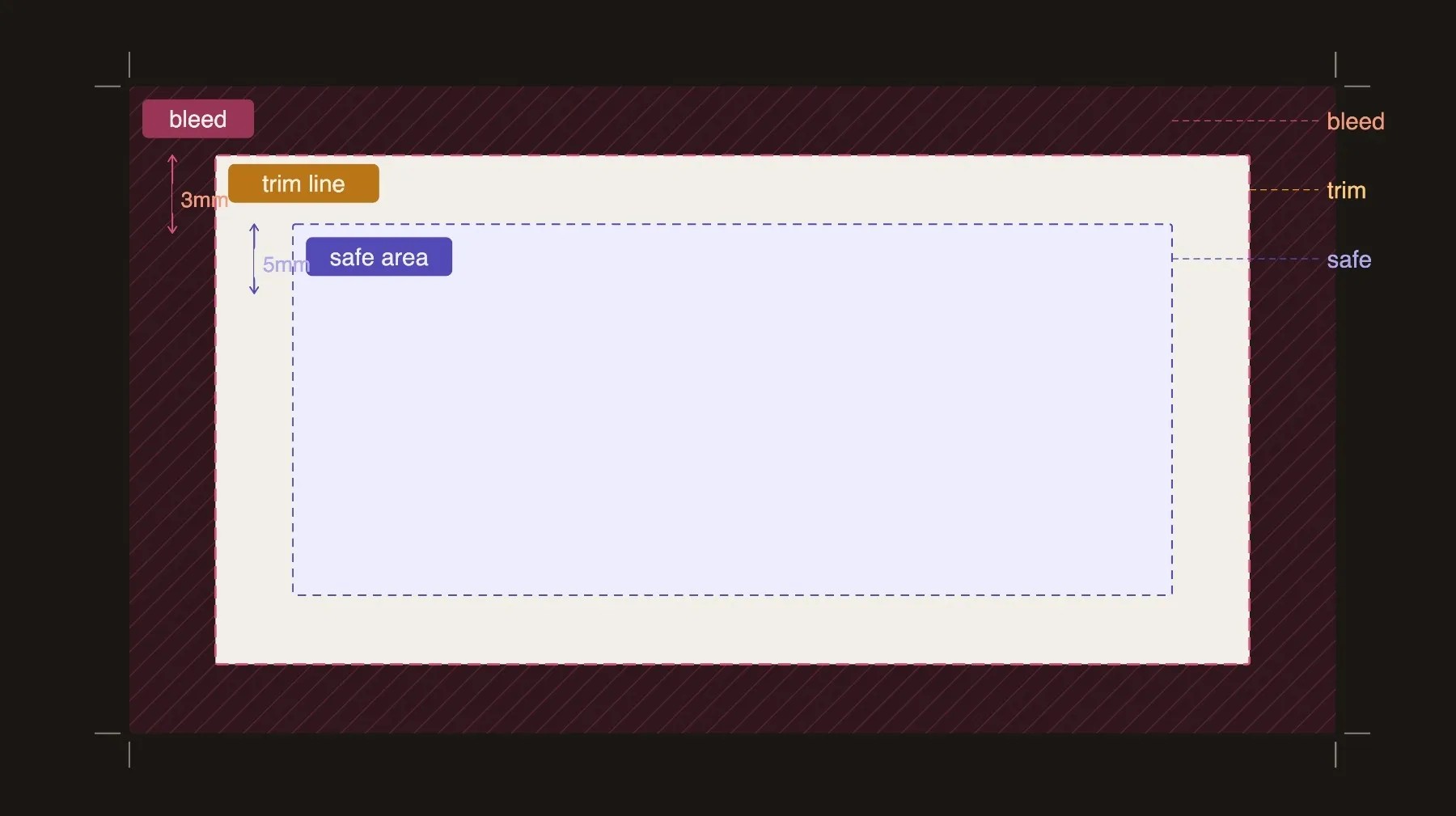
- Bleed. Most print products require a bleed of at least 0.125 inches on all sides. If your file doesn't have bleed, edges can come back with white lines after trimming.
- Resolution. Images should be at least 300 DPI at the final print size. Anything lower will print soft or pixelated.
- File format. Most printers prefer a press ready PDF. If you're working in Illustrator or InDesign, export with bleeds and crop marks included.
- Fonts. Outline your fonts before exporting or embed them in the PDF to avoid substitution errors.
If you're new to preparing files for commercial printing, this blog helps explain how to create print-ready files.
Understand the Proofing Process
A proof is your last line of defense before ink hits paper. Skipping it is a risk that almost never pays off.
Most online printers offer a digital proof, which is a PDF rendering of how your file will look when printed. Some offer hard proofs, which are physically printed samples sent before the full run.
For large orders or jobs where color accuracy is critical, a hard proof is worth the extra time and cost. For standard runs, a digital proof is usually enough.
When you receive a proof, check for:
- Colors that look off compared to your design file
- Text that's been cut off or sits too close to the trim edge
- Images that look soft or pixelated
- Any elements that shifted from where they should be
Before the job goes to print, get written sign off from your client. An email confirmation works. Something as simple as "Please reply to confirm you approve this proof for printing" is enough.
This step protects you if the client comes back after delivery, saying something doesn't look right. If they approved the proof, the design was signed off. If the printer made an error, that's a different conversation.
Decide How You'll Handle Billing and Markup
This is the part of print ordering that a lot of freelancers don't think through until they're already in the middle of a job. Have a policy before you need one.
There are two common approaches:
- Pass-through Pricing: This means you charge the client exactly what the printer charges you. You're not making anything on the print itself, just on the design work. Some designers prefer this because it's simple and transparent.
- Markup Pricing: You add a percentage on top of the print cost to cover your time managing the order, coordinating proofs, and handling any issues that come up. Industry standard markup runs from 20% to 25%. This is a legitimate business practice. Managing a print order takes real time, and that time has value.
Whichever approach you choose, be clear about it in your proposal or contract upfront. Surprises on an invoice are never a good look.
Freelance Tip: If possible, try to collect payment for print costs before placing the order. Never front the print cost yourself and hope to be reimbursed later.
Ship to You or Ship Directly to the Client?
Both options have a place depending on the job and the client relationship.
- Shipping to Yourself: This gives you a chance to inspect the order before it reaches the client. You can catch quality issues, short shipments, or damage before the client sees it. The downside is added time and the cost of reshipping. For high-stakes jobs or new printer relationships, this extra step is worth it.
- Shipping Directly to the Client: Much faster and cuts out the middle step. It works well once you have a printer you trust and a client who understands that you won't be inspecting the order before it arrives. Make sure the client knows the delivery window and who to contact if something looks wrong.
For large format printing, trade show materials, or anything with a tight event deadline, shipping directly to the venue or client is usually the right call.
Just make sure tracking information gets shared so no one is in the dark on delivery.
Build a Relationship With a Printer You Trust
Shopping for the cheapest quote on every job sounds like smart business. Over time, it usually isn't.
When you work with the same printer consistently, a few things happen. You learn their file requirements, their turnaround times, and their quality standards.
They learn your work. And when something urgent comes up, you have a real point of contact rather than a support ticket.
A reliable print partner also gives you more confidence when setting client expectations. If you know a printer consistently delivers in four business days, you can quote that timeline with confidence. If you're using a different vendor every time, you're always guessing.
Print Cartel works with freelance designers regularly and offers consistent quality across business cards, flyers, banners, trade show materials, and more.
If you're looking for a printer you can count on for client work, it's worth seeing what's available.
The Bottom Line
Ordering print for clients is one of those services that looks simple from the outside and has a lot of moving parts once you're in it. The designers who do it well aren't necessarily the ones with the most experience.
They're the ones who have a process: clear file prep, a proofing step that protects everyone, a billing policy they stick to, and a printer they actually trust.
Get those four things right and handling print for clients stops being a source of stress and starts being a reason clients keep coming back to you.
Frequently Asked Questions About Ordering Print for Clients
Do I Need to Tell My Client Which Printer I'm Using?
You don't have to, and most designers don't. What matters is that the final product meets the quality and timeline you promised. If a client asks, there's no reason to hide it, but it's not information you're obligated to share.
Is It Normal to Mark Up Print Costs?
Yes, and it's standard practice. Most freelancers add 20% to 25% on top of print costs to cover the time spent managing the order, coordinating proofs, and handling any issues. You're providing a service beyond the design itself, and that service has value.
What Happens if the Print Job Comes Back Wrong?
That depends on where the error came from. If it's a printer error, a reputable printer will reprint at no cost. If the error was in the file you submitted or was approved on a proof, the reprint cost typically falls on you or the client. This is why getting written proof approval before printing matters so much.
How Far in Advance Should I Order Print for a Client Event?
For standard print products, two weeks before the event date is a safe minimum. That gives you time for proofing, printing, shipping, and a buffer if anything needs to be corrected. For large format or specialty items, three weeks or more is a better target.